Draw a 16×16 pixel art heart in your browser
Make a four-colour heart sprite with a complete 16×16 pattern. Follow the drawing steps and download the reference PNG, text grid and JSON source.
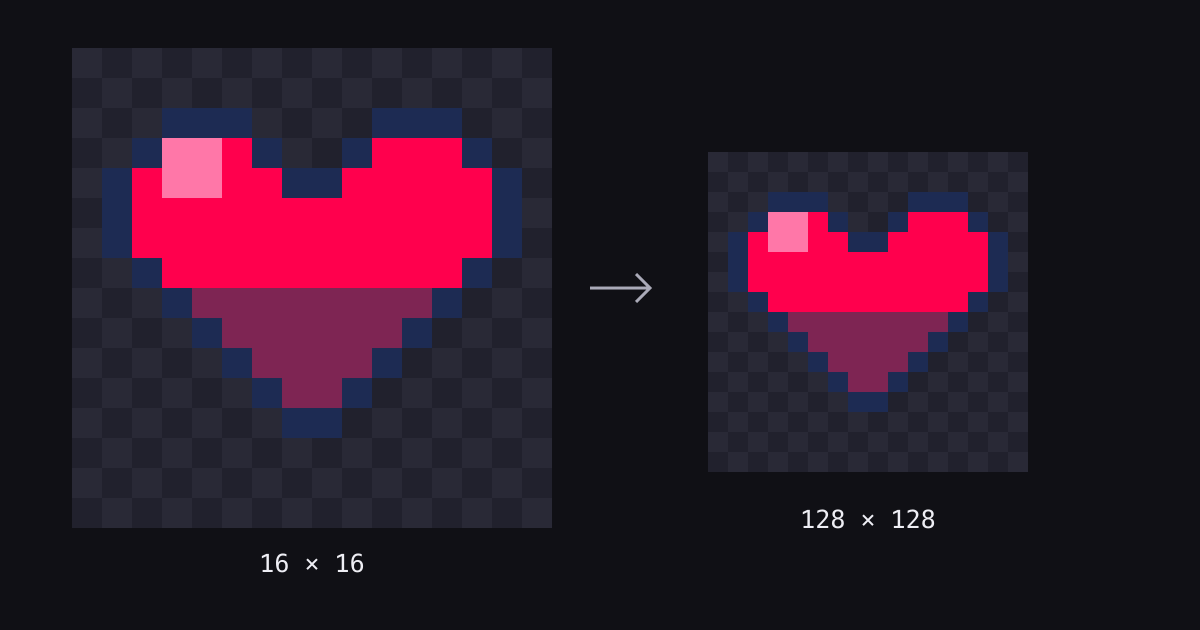
This pixel art heart uses four colours and a 16×16 canvas. You can draw it in the aukimi browser pixel editor without signing in. The complete pattern below lets you reproduce the same sprite rather than guess its proportions.
The finished drawing contains 100 coloured pixels and 156 transparent cells. A 16×16 PNG is the native sprite; enlarging it eight times gives a 128×128 preview with the same pixel shapes.
1. Set up the canvas and palette
Open the editor, choose 16x16 under Canvas Size and leave Show Grid enabled. The four colours are already in its palette. Select a swatch by its hexadecimal value:
| Symbol | Colour | Use |
|---|---|---|
| O | #1d2b53 | Outline |
| R | #ff004d | Main red |
| L | #ff77a8 | Highlight |
| D | #7e2553 | Shadow |
| . | — | Transparent: leave empty |
Each line in the pattern represents one row, read from left to right. The first line is the top of the canvas. Count rows and columns from 1 to 16. Dots stay empty; they are not white paint.
2. Follow the complete 16×16 pattern
................
................
...OOO....OOO...
..OLLRO..ORRRO..
.ORLLRROORRRRRO.
.ORRRRRRRRRRRRO.
.ORRRRRRRRRRRRO.
..ORRRRRRRRRRO..
...ODDDDDDDDO...
....ODDDDDDO....
.....ODDDDO.....
......ODDO......
.......OO.......
................
................
................- Choose the Brush and the outline colour O. Paint every O cell first. There are 30 outline cells, including the two cells joining the lobes on row 5.
- Choose red R, select Fill, then click inside the closed outline, for example row 6, column 6. This fills 70 interior cells.
- Return to Brush. Choose the highlight colour L and replace four red cells: rows 4–5, columns 4–5.
- Choose shadow colour D. Paint row 9, columns 5–12; row 10, columns 6–11; row 11, columns 7–10; and row 12, columns 8–9.
If Fill reaches the background, undo and check the O outline against the grid. Use the eraser to restore an accidentally painted transparent cell. The finished counts are O: 30, R: 46, L: 4 and D: 20.
3. Export at the size you need
Under Scale, choose 1x for a 16×16 image or 8x for 128×128, then select Export PNG. Scaling changes the exported dimensions, not the number of cells you draw. Save your result before closing the tab.
Export limitation: the free tool adds an aukimi.com watermark. A subscription removes it; simply creating a free account does not. Check the current plans before choosing an option. The reference files below reproduce the tutorial pattern separately; they are not examples of a watermark-free export from an unsigned-in session.
Reference files and a small exercise
- Native reference PNG, 16×16
- Enlarged reference PNG, 128×128
- Plain-text pattern and palette
- JSON source: colours and rows


The JSON is a readable reference, not an import format for this standalone editor. For a second version, redraw the same silhouette with a different red and compare it at native size. In a workshop, ask a partner to reproduce the text pattern and check the four colour counts.
Draw your own heart in the pixel editor. For animation and larger sprite projects, explore aukimi Pixel and its plan requirements.
Enjoyed this article?
Related Articles
The Creative Stack Just Collapsed: One Week of AI Tooling, Late April 2026
Between April 27 and May 4, 2026, Adobe, Luma, Novi, fal, Figma, Canva, HeyGen and Anthropic all crossed the same threshold in eight days. Here is what shipped, what it means, and where it leaves the browser-based creative suites trying to consolidate it all.
AI Music and SFX in 2026: What Actually Works in Indie Game Audio
Three years ago, indie game audio meant either licensing royalty-free libraries (cheap, generic, every game sounds the same) or hiring a composer (great, expensive). In 2026, AI generates score that ships. Here is which tools deliver — and where a human composer still wins.
AI Mesh Generation in 2026: What Actually Ships in Game Pipelines
Image-to-3D went from "uncanny demo" to "shipping in indie projects" in eighteen months. Here is what Tripo, Meshy, Rodin, and Hyper3D actually do in production — and where the 3D artist still beats the model every time.
Help Build the Future of Creative Software
Support aukimi development and get exclusive early access to the complete creative suite.